Petroleum Office

Your Engineering Calculations, Simplified and Standardized, Right in Excel.

Excel Functions for Petroleum Engineering

Build powerful, readable spreadsheets with comprehensive Excel functions for oil and gas.

Decline Curves

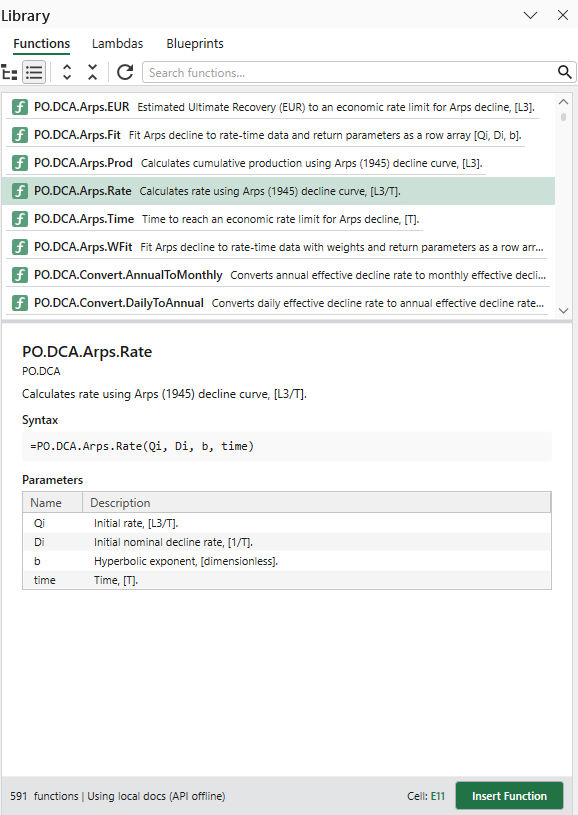
Arps and modern decline models.

  • Classic Arps decline models
  • Modified hyperbolic decline
  • Power-law exponential (PLE) decline model
  • Stretched exponential decline model
  • Duong decline model

Material Balance

Reservoir volumetrics and drive mechanism analysis.

  • Gas material balance (p/z method)
  • Havlena-Odeh oil material balance
  • Aquifer models (Fetkovich, VEH, Schilthuis)
  • Drive indices and expansion terms
  • Underground withdrawal

Well Productivity

IPR/PI across well types and flow regimes.

  • Vertical and horizontal wells
  • Steady/pseudo-steady/transient flow
  • Oil and gas well models
  • Drainage geometry
  • Hydraulic fracture productivity

Hydraulic Fracturing

Fracture geometry, fluid loss, and proppant transport.

  • PKN, KGD, and radial fracture models
  • Carter leakoff coefficients and efficiency
  • Proppant settling and transport
  • Fractured well productivity
  • Fracture length and width

Pipe Flow Performance

Single- and multi-phase flow correlations.

  • Beggs & Brill, Hagedorn & Brown, Gray
  • Ansari, Hasan-Kabir, Orkiszewski
  • Duns & Ros, Mukherjee-Brill
  • Single-phase liquid and gas flow
  • Poettmann-Carpenter

Surface Facilities

Choke flow and pipeline hydraulics.

  • Critical flow (Gilbert, Ros, Baxendell, Achong)
  • Subcritical flow (Sachdeva, Ashford-Pierce)
  • Single-phase gas and liquid chokes
  • Gas pipelines (Weymouth, Panhandle A/B)
  • Liquid pipeline pressure drop and sizing

Pressure Transient Analysis

Analytical well test models.

  • Line-source solution
  • Constant-pressure and sealing-fault boundaries
  • Type curves in real and dimensionless spaces
  • Dimensionless variable conversions
  • Multiple well/boundary configurations

ESP

Electrical submersible pump design and analysis.

  • Head-pressure conversions and pump curves
  • Gas handling and viscosity corrections
  • Motor and cable sizing
  • System analysis and pump selection
  • Intake pressure calculations

Gas Lift

Gas lift valve mechanics and injection design.

  • Dome pressure at depth
  • Valve performance (IPO/PPO)
  • Injection system design
  • Nitrogen-charged valve calculations
  • Gas lift valve sizing

Rod Pump

Sucker rod pump design calculations.

  • Pump displacement and stroke
  • Rod string weight and stretch
  • Rod stress analysis
  • Polished rod loads
  • Counterbalance and torque

PVT Modeling

PVT property correlations for oil, gas, and water.

  • Bubble point pressure
  • Formation volume factor
  • Solution gas-oil ratio
  • Viscosity and compressibility
  • Gas Z factor

Equation of State

Compositional modeling with cubic EoS.

  • Peng-Robinson and SRK equations of state
  • Flash calculations and phase envelopes
  • Bubble/dew point pressure and temperature
  • Fugacity, K-values, and density
  • Component database and binary interaction

Reservoir Rock Properties

Relative permeability and capillary pressure.

  • Corey and LET relative permeability models
  • Honarpour and Ibrahim-Koederitz correlations
  • Three-phase models (Stone I, Stone II)
  • Capillary pressure (Brooks-Corey, Van Genuchten)
  • Rock compressibility correlations

Flow Assurance

Hydrate prevention, corrosion, and erosion.

  • Hydrate temperature depression
  • Inhibitor concentration and injection rates
  • CO2 corrosion prediction (de Waard-Milliams)
  • Erosional velocity (API 14E)
  • Corrosion management and unit conversions

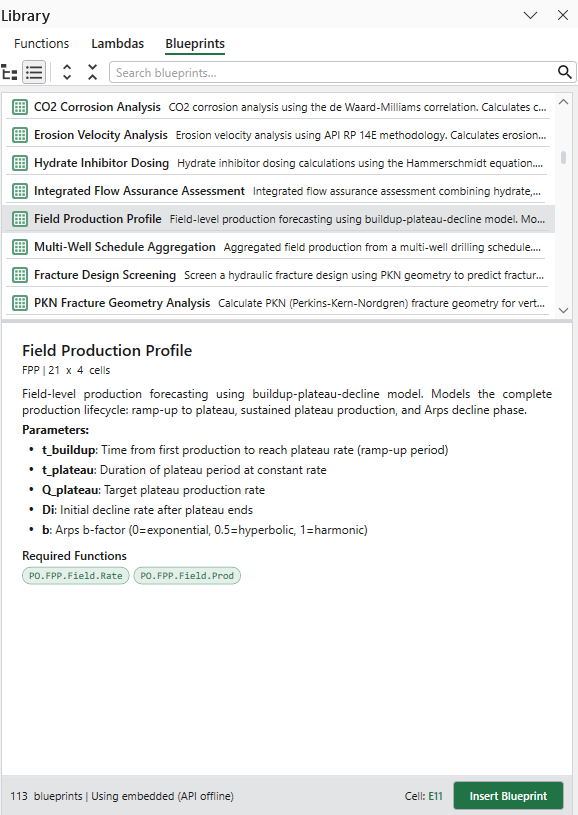
Field Production Profiles

Aggregate production forecasting.

  • Multi-well production profiles
  • Field-level decline analysis
  • Production aggregation and summation
  • Time-shifted well additions
  • Cumulative production tracking

Productivity Tools

Beyond our Excel functions, streamline your everyday engineering workflows with powerful tools.

Unit Converter

1,500+ petroleum engineering units

  • Quick conversions from the ribbon
  • Custom unit expressions (e.g., bbl*psi/day)
  • Scaled units (e.g., 640 acre)
  • Search and copy unit abbreviations

File Generator

Batch-create input files from Excel

  • Define tokens in template files
  • Map cases and parameters in Excel
  • Generate hundreds of scenario files
  • Ideal for sensitivity analysis

Eclipse Results Import

Load simulator output directly

  • Import .SMSPEC/.FSMSPEC files
  • Each case becomes a worksheet
  • All data vectors in columns
  • Ready for analysis immediately

Who Uses Petroleum Office?

Trusted by petroleum engineers at every level - from the field to the boardroom

Engineering Managers & VPs

Former petroleum engineers now making strategic decisions in Excel

  • Speed: Validate assumptions in minutes, not hours
  • Transparency: Quick sanity checks for stakeholder discussions
  • Risk Mitigation: Eliminate calculation drift across teams
  • Standardization: Consistent methodology across all projects

Senior Engineers

Hands-on professionals building models and running daily analyses

  • Productivity: Hundreds of functions eliminate custom VBA maintenance
  • Accuracy: Thousands of unit conversions prevent costly errors
  • Consistency: Industry-verified correlations and formulas
  • Time Savings: Blueprints and samples accelerate workflows

Consultants & Independents

Professionals delivering client-ready screening calculations and technical analyses

  • Affordable: Pennies compared to traditional oil & gas software
  • Professional: Commercially validated functions for client trust
  • Efficiency: Standardized calculations across multiple projects
  • ROI: Save 10-15 hours per client engagement

Why Petroleum Office?

Instead of creating a stand-alone petroleum engineering application, we decided to build upon the strengths of Excel and make it a better tool for petroleum engineering calculation. Here's how and why.

Ease of Use

Many say that Excel is a #1 tool for engineers. Everybody knows how to use it, hence the learning curve for the add-in is very shallow.

Simplicity

We are fans of simple calculations that allow the engineer to get a 90% answer quickly rather than a laborious effort to get a supposed 100% outcome.

Readability

You only create spreadsheet once. You read and edit it many times. Meaningful function names instead of complex formulas will keep your spreadsheets concise.

Consistency

Consistent result across all spreadsheet models. Reduce errors and eliminate typos.

Productivity

Keep all related inputs and calculations in one place. Less copying and pasting between applications.

Save time

Unit converter, file generator, and blueprints will save you a lot of time. Not to mention that coding VBA functions could be hard and time consuming.

How Does Petroleum Office Work?

Petroleum Office integrates seamlessly into Excel, adding a ribbon tab with hundreds of petroleum engineering functions and powerful tools.

1. Download & Install

Download and start your 7-day free trial. Install in minutes.

2. Open Excel

Find the Petroleum Office ribbon tab with all functions organized by category.

3. Start Calculating

Insert functions directly into your spreadsheets or use built-in tools and samples.

Choose Your Plan

Start with a 7-day free trial

Pro

from $ 30 /month
  • Function Library
  • 500+ Excel Functions
  • Unit Converter (2500+ units)
  • Engineering Tools
  • 7-Day Free Trial
  • Free Updates
View Pricing

Need licenses for your team? Check our bulk pricing options

Trusted by Petroleum Engineers Worldwide

500+
Excel Functions
2500+
Unit Conversions
100+
Customers
24/7
Support Available

GET STARTED TODAY!

An unhandled error has occurred. Reload X